


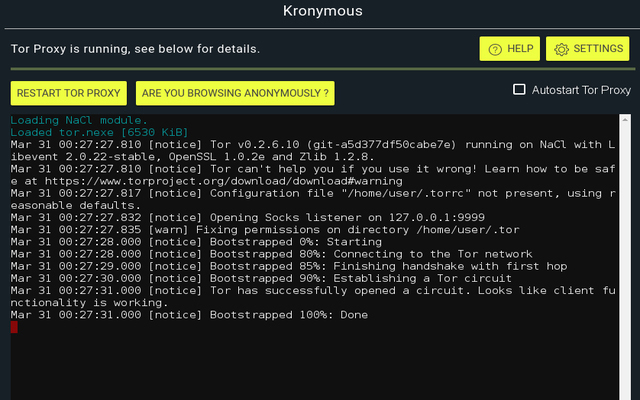
Kronymous is a Chrome application that creates a system-wide tor socks proxy that provides access to the Tor network.
See details = HERE =
The application comes with Google Chrome. Therefore, you should install Google Chrome which is in our repository.
You must create an extension after installation. Name of extension is SwitchyOmega. Search the extension via Settings > Other Applications > Extensions. Right click on the Extension icon then add to icons.
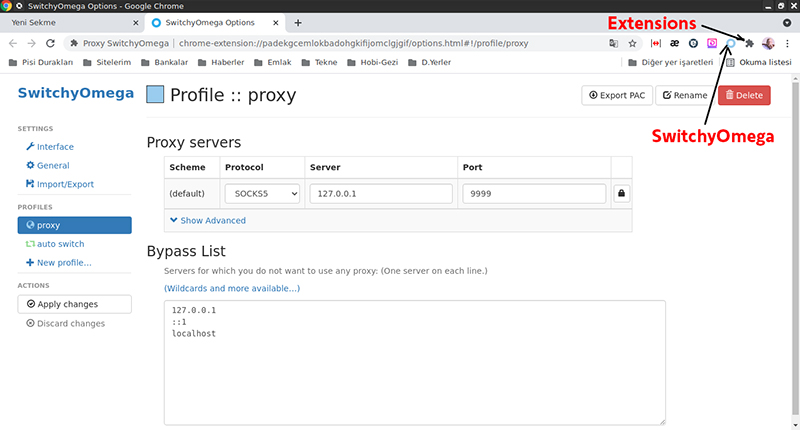
- Click on SwitchyOmega icon and choose Option.
- Select Proxy on the left and choose below ones:
Protocol Socks5
Server 127.0.0.1
Port 9999
then Apply it.
- Run the application via Application Launcher > Found > Kronymous.
- Click Start Tor button to start session. Check the connection as shown in the picture.
- Launch Google Chrome and hit SwitchyOmega icon then press Proxy.
- Your private link is ready now. Your connections may be little slower.
The page was prepared by Ali Cengiz Kurt